


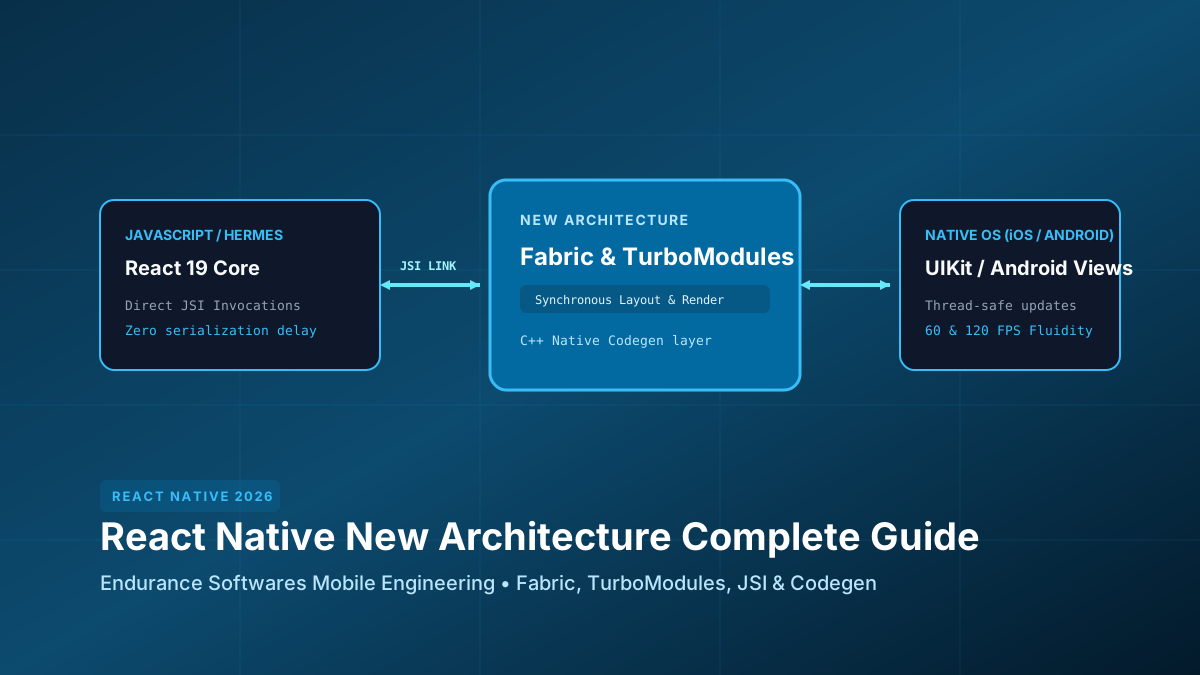
The New Architecture replaces asynchronous serializing JSON queues with direct C++ JSI bindings. Fabric allows React to execute layout passes synchronously with the native UI thread, completely eliminating blank frame flickers during rapid scrolling in complex feeds.
The 3 Pillars of the New Architecture
| Component | Old Architecture (Bridge) | New Architecture (2026) |
|---|---|---|
| Communication | Asynchronous JSON serialized strings over async queue | Direct synchronous memory access via C++ JSI pointers |
| Rendering Engine | Legacy UI Manager (async shadow tree) | Fabric (immutable C++ shadow tree, thread-safe) |
| Native Modules | Eager initialization of all modules at app boot | TurboModules (lazy loading on demand) |
| Type Safety | Manual runtime bridging prone to type crashes | Codegen (build-time C++ header generation) |
Eliminating Frame Drops & Jitter
Under the old bridge, when a user scrolled through a long list of 500 products, touch events in native OS had to be serialized to JSON, queued, sent to JS, processed, and response layout batches sent back to native. If JS was busy computing state, the UI rendered empty white rectangles.
With Fabric and JSI, JavaScript state and native view trees share direct memory references. Touches trigger synchronous layout recalculations with zero queue delays.
Writing a Typed TurboModule with Codegen
TurboModules are defined using strict TypeScript interfaces. The React Native build tooling automatically generates C++ glue code, Swift protocols, and Kotlin interfaces at compile time:
// NativeDeviceSecurity.ts - TypeScript TurboModule Codegen Spec
import type { TurboModule } from "react-native";
import { TurboModuleRegistry } from "react-native";

export interface Spec extends TurboModule {
  // Synchronous JSI call: Zero JSON serialization overhead
  isDeviceBiometricsEnrolled(): boolean;

  // Asynchronous hardware cryptographic attestation
  generateHardwareAttestation(challengeBase64: string): Promise<{
    attestationToken: string;
    keyId: string;
    hardwareSecurityLevel: string;
  }>;
}

export default TurboModuleRegistry.getEnforcing<Spec>("NativeDeviceSecurity");
Creating High-Performance Fabric Components
Custom native views (such as advanced interactive maps, hardware camera viewfinders, or video players) are declared via codegenNativeComponent:
// NativeMapViewComponent.ts - Fabric Component Spec
import type { ViewProps } from "react-native";
import type { DirectEventHandler, Double } from "react-native/Libraries/Types/CodegenTypes";
import codegenNativeComponent from "react-native/Libraries/Utilities/codegenNativeComponent";

export interface MapViewProps extends ViewProps {
  initialLatitude: Double;
  initialLongitude: Double;
  zoomLevel: Double;
  onPinSelected?: DirectEventHandler<{ pinId: string; title: string }>;
}

export default codegenNativeComponent<MapViewProps>("CustomFabricMapView");
React 19 Concurrency & Suspense Transitions
Fabric is built to support React 19 concurrent features natively on mobile devices. You can prioritize urgent animations with startTransition while background data fetches stream without interrupting 120Hz refresh rates.
Mobile Migration Checklist
✓ newArchEnabled=true configured in gradle.properties and Podfile
✓ Hermes JavaScript engine enabled with bytecode precompilation
✓ All legacy bridge modules converted to Typed TurboModules
✓ Codegen specs validated in continuous integration (CI)
✓ Memory profiling verified with Xcode Instruments and Android Profiler
✓ Direct synchronous JSI calls used for biometric / cryptographic checks
✓ FlashList used for virtualized high-performance 120 FPS lists
✓ App startup time benchmarked below 800ms on budget Android devices
Build Next-Gen Mobile Apps with Endurance Softwares
Our mobile engineering specialists build high-performance React Native, iOS, and Android applications with cutting-edge architecture.
Plan Your Mobile ApplicationFrequently Asked Questions
Can existing third-party libraries work with the New Architecture?
Most popular libraries (React Navigation, Reanimated 3, Gesture Handler, MMKV) have native New Architecture support. For unmaintained libraries, React Native provides an interop layer.
Does the New Architecture decrease app bundle size?
Yes! Because TurboModules are loaded lazily on demand and Hermes strips unused runtime metadata, app initial RAM footprints drop by up to 35%.
Do I need to write C++ to use TurboModules?
No! You can write your native code entirely in Swift for iOS and Kotlin for Android. Codegen generates the required C++ bridging layer automatically.